Tag Archives: DotNetNuke

DotNetNuke vs WordPress #1 – Series Intro

DotNetNuke vs WordPress Image

DotNetNuke vs. WordPress is a question that I’ve asked several times over the past few years. I’ve been using DotNetNuke since 2006, and WordPress since sometime in 2008 or 2009.

What qualifies me to write this series?

  1. I’ve used both platforms on a personal level
    — Over the years I have built websites for myself using both DNN and WordPress. The individual uses range from personal blog to self-started business or sites for friends
  2. I’ve used both platforms on a professional level
    — It’s going on several years that I have had website clients. Working as a contractor for Leapwise Media, I still deploy sites for clients using either framework, dependent on their needs.
  3. I still use both platforms on both a personal and professional level
    — In spite of the advantages of one platform over the other in some cases, I still use both, daily. I have clients and personal sites that I interact with on a daily basis, so I’m touching sites of both kinds regularly.
  4. I have purchased and used both free and professional themes/skins and modules/plugins for both platforms.
    — I have communicated with developers and designers for each platform, many of them “rock stars” in their own right.
  5. I have used professional hosting services for both platforms.
    — People hosting sites of all kinds have questions about hosting. Having used both applications in a paid hosting environment with multiple vendors gives me additional perspective.

Am I an incredible code guy? No.
Am I an amazing designer? No.
Am I a legend in either community? No.
Am I a true expert in SQL Server or MySQL or ASP.NET or PHP? No.

Here’s the key question for this series…
Am I a guy that has used these products over and over, administered sites, gotten his hands dirty with code, asked questions in public that he’s embarrassed by, and lived to tell about it all? YES

This is enough to get us started on the discussion, but I also want to leave you with the plan for this series. I’ll be taking on topical pieces to go somewhat in depth one thing at a time. The series will look something like this:

Series Links

Additional topics will probably come up along the way, and if you think of something that ought to be covered, please comment on this post.

The series is meant to be an overview of each topic, not a detailed, in-depth, line-by-line examination. Feel free to voice your opinions on each post. Speak your mind, I don’t mind! 🙂

Thanks,
Chad
dnnWerk User Module Fix for DotNetNuke 6

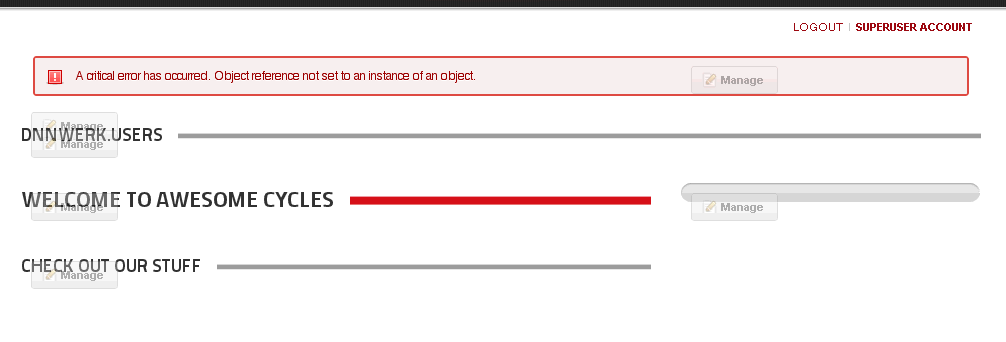
So, you’re going about your business, you upgrade your DotNetNuke 5.6.2 site to the latest, greatest version 6.0 that the world has been so vocal about, and then you go to use one of your favorite modules, dnnWerk Users. After adding it to the page, you click the update settings button and you end up with this, the dreaded “Object reference not set to an instance of an object” error. Oh no!

7-28-2011 10-11-40 AM

So, like any good DotNetNuke community member, you run to G+, Twitter or the Forums without doing any troubleshooting of your own. WRONG! First you take a look at the error message under Admin > Event Viewer, see if the text of the error means anything to you, see what you can do to fix it. Then you try uninstalling the module, reinstalling the module, changing skins and containers, etc., etc. When at last you have exhausted the possibilities using your own brain, you post your questions in the appropriate places.

I find Twitter and G+ to be the most responsive of places to get questions answered, so I went there first and got several recommendations, anything from re-uploading the .dll’s in the /bin directory of my install to checking if a different skin or container worked. In the end, Brian Dukes saw the simple message in the error that there was more than one instance of a Telerik Rad Stylesheet Manager. This part of the error message read, “There must be only one instance of RadStyleSheetManager per page.” He noticed there was a reference to said object in the uc_Manage.ascx file.

This file is located at the root of your DNN install in DesktopModulesAdmindnnWerk.Users…

7-28-2011 10-09-07 AM

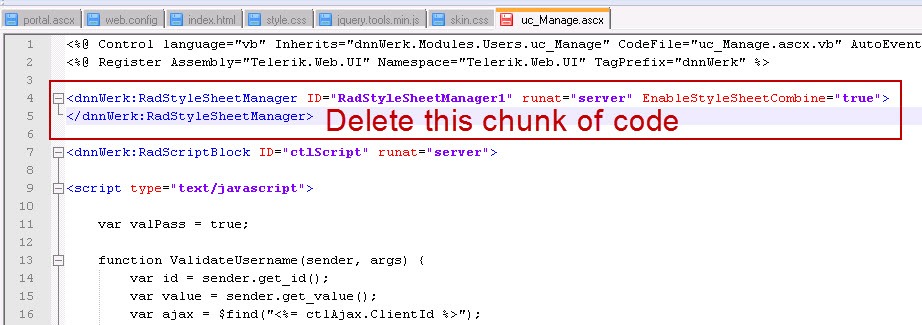
Open the file and remove the following line:

<dnnWerk:RadStyleSheetManager ID="RadStyleSheetManager1" runat="server" EnableStyleSheetCombine="true"> </dnnWerk:RadStyleSheetManager>

7-28-2011 10-29-50 AM

Save the file and restart the application from Host > Host Settings. Or you can CNTRL + F5 to refresh everything. And then you get back to your lovely dnnWerk User module, so the world now has order once more. Now, of course, you probably don’t want to throw that module on your home page, but hey, for the sake of a quick demo, you get the point.

7-28-2011 10-13-07 AM

To download the latest copy of the FREE Community Edition of DotNetNuke, visit http://www.dotnetnuke.com.

To download the latest copy of dnnWerk Users, visit http://dnnusers.codeplex.com.

Bare Bones Code Editing in DotNetNuke

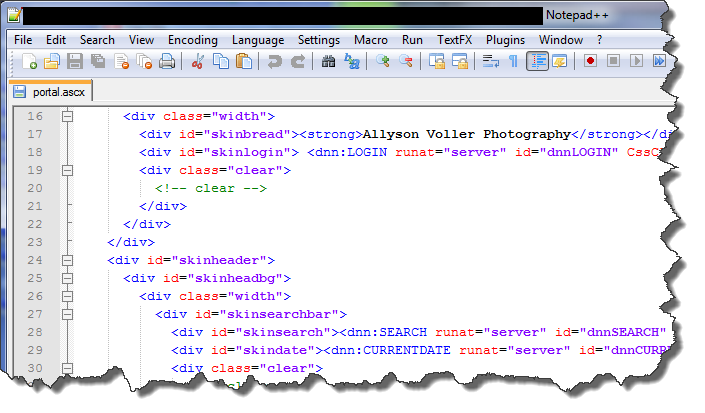
notepad

Noob, Noobie, Newb, Greenie, Rookie, Beginner… I still find it hard at times NOT to think of myself with one of those labels when it comes to code. More and more, though, I’m seeing that I’ve graduated from Total Noob to Intermediate.

Now, before I get ahead of myself, I’m still very much an infant when it comes to higher level coding. For the most part, though, I’ve moved beyond the absolute basics, and feel I have something to offer. If I never get to the point where I challenge myself to try to add value to the community, then my own learning will stagnate. At the point you attempt to offer knowledge, you run the risk of being exposed and critiqued. I’m ok with that Smile.

For several years now, I’ve been working with DotNetNuke, and more recently, WordPress. Each of these requires editing code at some level, and these days I find that to be a BASIC requirement when building sites using either system. Yes, I now believe it is a basic, fundamental skill that any website designer, administrator, or even graphic designer needs to be familiar with. Editing code now just comes as part of the expectations, at times even for the simplest of personal blog sites.

So, let me share with you the two tools I think you need to do basic code editing,when it comes to DotNetNuke. That’s right, I only consider 2 programs as requirements for bare bones editing. The main goal here is to give the end user a light-weight option that requires minimal download and install time, but robust editing ability.

These tools can be used for almost limitless other types of editing, as well, but most of my work is with DotNetNuke. You quickly become familiar with the following main file extensions when working with DNN – .ascx, .aspx, .htm(l), .css, .js, .xml. To be sure, there are many more file types you could have in a DNN install, but for basic editing you won’t really get past these much.

There really is ONE main editing program I use to edit all of these file types, Notepad++. I do use Microsoft Visual Web Developer Express 2010, also free, but it demands much more when it comes to system resources, the install is long and arduous, and so it does not qualify for either light-weight or fast install. While you CAN use the built-in Notepad app on Windows OS, Notepad++ has so many more features and options that it simply leaves Notepad in the dust.

Notepad++ gives you all of these features.

  • Tabbed file browsing – open multiple files in tabs across the top.
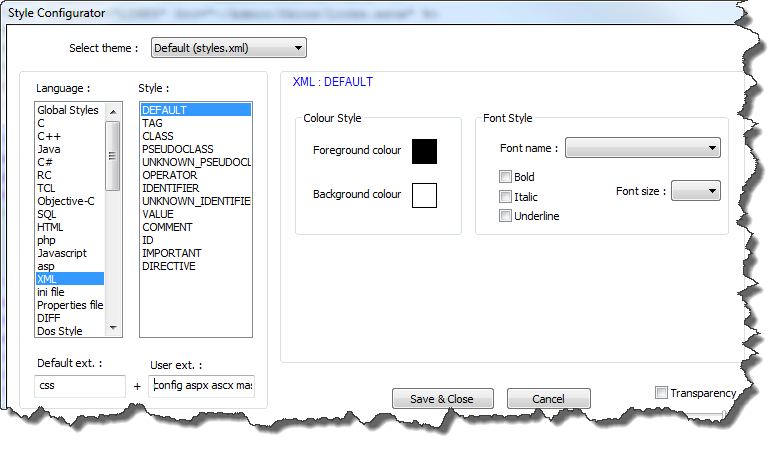
  • Syntax highlighting – to enable this for .ascx, .aspx, .config files, open Settings > Style configurator. On the left under Language: choose XML, and on the right under User ext. : type (space delimited, no dots) config ascx aspx – then press Save & Close, and you’ll have highlighted syntax when editing these files – See Figure 2 below.
  • Terrific find and replace options – If you have a small piece of code that needs to be replaced, you can actually use Notepad++ to find and replace within files that are in any directory on your computer, without opening them. This is particularly useful when editing a DotNetNuke skin that has several .ascx files in which you need to change something across the board.
  • Pinned recent files to reopen something you closed but need to get back to in a hurry.
  • Program updates from within the application. Check for updates and automatically download/upgrade on the fly!
  • Loads of customizations, down to the color scheme, recording your own macros, file extension attribution, and more.

Figure 2

notepad  styles

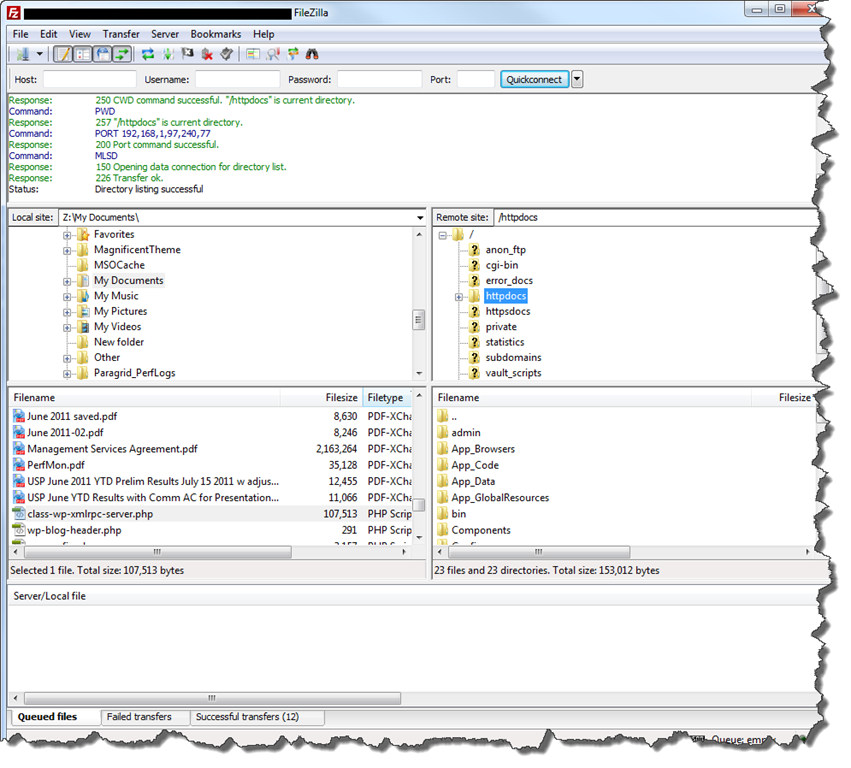
The “other” main tool that I have to say is indispensible for me is Filezilla. Filezilla is a free FTP (File Transfer Protocol) application that allows the user to transfer files to and from their web server using a Graphic User Interface. While it doesn’t really “edit” code, I consider it one of my two bare bones utilities because most of the time when I edit files, I’m immediately transferring them to a test or production server over the WWW. Filezilla gives you the following sweet options:

  • Save each FTP connection so you can quickly connect to your sites in the future
  • Drag and drop transfer between your local computer and the remote server
  • Overwrite confirmation pop-up that prevents you from hosing files by mistake

Filezilla Screenshot

filezilla

With these two tools in your editing toolbox, you can edit most, if not all, file types you’ll come across when you need to modify basic code in DotNetNuke skins, containers and modules. Happy editing!