 Can you work all day using only an iPad 2? I mean, really work?
“C’mon, man, I’ve got to run spreadsheets and show presentations!”
“I have to able to send and receive all kinds of emails throughout the day.”
“There’s no way that thing can do what I can do on my computer.”
Having said those things myself, I was encouraged by my boss the other day to get an iPad 2 and “push it to the limit.” He said, “We want to be able to hire a sales force and say, ‘Here’s your iPad, now go get ‘em.’” Funny thing is, I had just asked for a MacBook Pro, as I’ve been getting used the MacBook Air that I got for free and liked many things about it. However, I need more horsepower, space, headroom for peripherals, etc. if I’m going to use a Mac notebook all day every day. So, naturally, my boss told me to get an iPad. 🙂
 I picked up a refurbished model from Newegg.com and started waiting… and thinking. How can I equip a sales force with just a tablet to get all of their work done? So, I figured if I could use it all day, and I’m an I.T. guy, then any sales guy could get by with it. I’ve got to RDP into computers, assist remote users, run real programs.
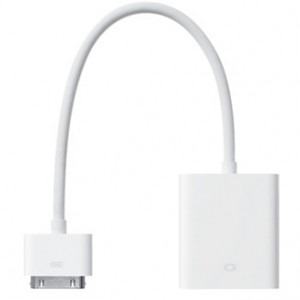
Instantly I thought about peripherals. There’s no USB support on the iPad 2, so how would I get by without a keyboard and mouse? Thankfully, there is Bluetooth support, so I ran to the store and grabbed a Kensington Keyfolio. Then I thought about the screen size, and how well would I do with the iPad screen for an entire day. Also, what if I needed to share a presentation with someone to either a projector or TV? I also picked up 2 adapters, one for VGA output to connect to any VGA device (usually a monitor or projector) and I got the HDMI adapter. The HDMI adapter is cool because it will carry audio as well as video, so you could stream a video of some kind to screen and pick up the audio.
 Peripherals in hand, I continued thinking about apps and connectivity to the office. What if I did need to run Power Point or Excel? What if I really had to get to a Windows PC for something? Most of our users, if not all, rely on their Windows PC’s to get work done every day. Whether you’re PC or a Mac doesn’t really matter, this is our reality. That’s where our decision last year to deploy a new SAN comes into play.
When we implemented virtualization in our data center, we included Citrix XenDesktop to support folks in our California and Mexico offices. It’s a great concept whereby a user can connect to our website and spin up a virtual machine running all of his/her office applications. Citrix Receiver is free for iPad, so as long as the user has a user account on our network, they can get in and run Microsoft and other Windows specific applications. This means they can plug in to our ERP system, enter transactions, update files and more. All the while, the data remains safe and secure in our data center.
I figured there would have to be some 3rd party applications to purchase and download via the App Store, as well. There are some very useful applications, most of them included in iOS 5 or free from the App Store. I’ll get to those in a bit.
 Can it be done, though? Can it really be done? With everything ready to go, I set about to work the entire day at the office using only the iPad 2. I came in, connected the VGA adapter to my monitor, propped up the folio style case, and powered up. Now right there we have 2 things to note:
- The VGA output and it’s potential added strain on the iPad’s battery
- The Bluetooth connected keyboard and it’s battery drain on the iPad
The day began with me having approx. 75% battery life in the iPad. I hadn’t charged it all night, just during the car ride up to the office, so I didn’t have time to get things to 100% before the day got going. No matter, it was part of the experiment. But by the time I got to 2 p.m., the battery was down to 30%. This would not be the case on a typical day for Sales Guy, though. Not only was I using WIFI like crazy, had a monitor and keyboard attached, but I also bought a bunch of apps from the App Store, ran my existing applications into the ground, remote controlled computers, used my XenDesktop, and more.
I’d say that if I had 100% battery to start the day and only used the iPad for email and basic office connectivity, I could have run the whole day. As it is, my battery would have been closer to 55%, since I started the day off behind. That would have been plenty to get me through the day, even had I continued using only the iPad.
 What if I had just an iPad, no accessories?
For most people, it could be done. The iPad has so much native connectivity, as well as access to the App Store for specialties, that you really could do most everything with it. If you’re a specialist, a tablet is probably not the way you want to go for your work, anyway, but if Sales Guy had his iPad with the right apps, he’d be fine.
How could you be okay though? Just an iPad? Really? Think about these items:
- It’s 2012 – We have the cloud, we have mobile connectivity (3G data plan w/iPad), we have advanced apps
- Out of the box, iPad connects to Gmail, Exchange, and more – booya
- Apps like QuickOffice Pro HD and Keynote, Numbers, Pages, Salesforce Mobile Dashboards, Evernote and others allow you to connect to your cloud file repository provider (Dropbox, Skydrive, etc.)
- What do most business people really have to do besides send emails and view some files? I mean, really.
- Getting by with less computing power actually simplifies things, so you can focus on what you’re good at… which probably isn’t computing. 🙂 Go sell.
I will say that if you are going to do serious work on an iPad, you probably need to make sure to get a Bluetooth keyboard. At the very least, if you’ve got lots of typing to do, the iPad is a pain in the neck to use for an extensive day of working the touch screen keyboard!
There’s a world of other stuff waiting to be discovered out there, but this is what I’ve learned so far. The iPad 2 is an amazing device, and when properly equipped (and charged!), even an I.T. guy can use it for a full day of work at the office. Let me know if you know of any must-have apps or peripherals!