Category Archives: Cheeky Geek

From that snappy tech gnome that lives in my heart.

DotNetNuke vs WordPress #1 – Series Intro

DotNetNuke vs WordPress Image

DotNetNuke vs. WordPress is a question that I’ve asked several times over the past few years. I’ve been using DotNetNuke since 2006, and WordPress since sometime in 2008 or 2009.

What qualifies me to write this series?

  1. I’ve used both platforms on a personal level
    — Over the years I have built websites for myself using both DNN and WordPress. The individual uses range from personal blog to self-started business or sites for friends
  2. I’ve used both platforms on a professional level
    — It’s going on several years that I have had website clients. Working as a contractor for Leapwise Media, I still deploy sites for clients using either framework, dependent on their needs.
  3. I still use both platforms on both a personal and professional level
    — In spite of the advantages of one platform over the other in some cases, I still use both, daily. I have clients and personal sites that I interact with on a daily basis, so I’m touching sites of both kinds regularly.
  4. I have purchased and used both free and professional themes/skins and modules/plugins for both platforms.
    — I have communicated with developers and designers for each platform, many of them “rock stars” in their own right.
  5. I have used professional hosting services for both platforms.
    — People hosting sites of all kinds have questions about hosting. Having used both applications in a paid hosting environment with multiple vendors gives me additional perspective.

Am I an incredible code guy? No.
Am I an amazing designer? No.
Am I a legend in either community? No.
Am I a true expert in SQL Server or MySQL or ASP.NET or PHP? No.

Here’s the key question for this series…
Am I a guy that has used these products over and over, administered sites, gotten his hands dirty with code, asked questions in public that he’s embarrassed by, and lived to tell about it all? YES

This is enough to get us started on the discussion, but I also want to leave you with the plan for this series. I’ll be taking on topical pieces to go somewhat in depth one thing at a time. The series will look something like this:

Series Links

Additional topics will probably come up along the way, and if you think of something that ought to be covered, please comment on this post.

The series is meant to be an overview of each topic, not a detailed, in-depth, line-by-line examination. Feel free to voice your opinions on each post. Speak your mind, I don’t mind! 🙂

Thanks,
Chad

Working All Day With an iPad 2

withoutpicCan you work all day using only an iPad 2? I mean, really work?

“C’mon, man, I’ve got to run spreadsheets and show presentations!”

“I have to able to send and receive all kinds of emails throughout the day.”

“There’s no way that thing can do what I can do on my computer.”

Having said those things myself, I was encouraged by my boss the other day to get an iPad 2 and “push it to the limit.” He said, “We want to be able to hire a sales force and say, ‘Here’s your iPad, now go get ‘em.’” Funny thing is, I had just asked for a MacBook Pro, as I’ve been getting used the MacBook Air that I got for free and liked many things about it. However, I need more horsepower, space, headroom for peripherals, etc. if I’m going to use a Mac notebook all day every day. So, naturally, my boss told me to get an iPad. 🙂

5I picked up a refurbished model from Newegg.com and started waiting… and thinking. How can I equip a sales force with just a tablet to get all of their work done? So, I figured if I could use it all day, and I’m an I.T. guy, then any sales guy could get by with it. I’ve got to RDP into computers, assist remote users, run real programs.

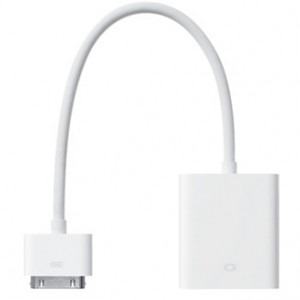
Instantly I thought about peripherals. There’s no USB support on the iPad 2, so how would I get by without a keyboard and mouse? Thankfully, there is Bluetooth support, so I ran to the store and grabbed a Kensington Keyfolio. Then I thought about the screen size, and how well would I do with the iPad screen for an entire day. Also, what if I needed to share a presentation with someone to either a projector or TV? I also picked up 2 adapters, one for VGA output to connect to any VGA device (usually a monitor or projector) and I got the HDMI adapter. The HDMI adapter is cool because it will carry audio as well as video, so you could stream a video of some kind to screen and pick up the audio.
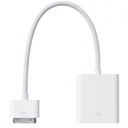
ipad-dock-to-vga-adapterPeripherals in hand, I continued thinking about apps and connectivity to the office. What if I did need to run Power Point or Excel? What if I really had to get to a Windows PC for something? Most of our users, if not all, rely on their Windows PC’s to get work done every day. Whether you’re PC or a Mac doesn’t really matter, this is our reality. That’s where our decision last year to deploy a new SAN comes into play.

When we implemented virtualization in our data center, we included Citrix XenDesktop to support folks in our California and Mexico offices. It’s a great concept whereby a user can connect to our website and spin up a virtual machine running all of his/her office applications. Citrix Receiver is free for iPad, so as long as the user has a user account on our network, they can get in and run Microsoft and other Windows specific applications. This means they can plug in to our ERP system, enter transactions, update files and more. All the while, the data remains safe and secure in our data center.

I figured there would have to be some 3rd party applications to purchase and download via the App Store, as well. There are some very useful applications, most of them included in iOS 5 or free from the App Store. I’ll get to those in a bit.

iphone-battery-iconCan it be done, though? Can it really be done? With everything ready to go, I set about to work the entire day at the office using only the iPad 2. I came in, connected the VGA adapter to my monitor, propped up the folio style case, and powered up. Now right there we have 2 things to note:

  1. The VGA output and it’s potential added strain on the iPad’s battery
  2. The Bluetooth connected keyboard and it’s battery drain on the iPad

The day began with me having approx. 75% battery life in the iPad. I hadn’t charged it all night, just during the car ride up to the office, so I didn’t have time to get things to 100% before the day got going. No matter, it was part of the experiment. But by the time I got to 2 p.m., the battery was down to 30%. This would not be the case on a typical day for Sales Guy, though. Not only was I using WIFI like crazy, had a monitor and keyboard attached, but I also bought a bunch of apps from the App Store, ran my existing applications into the ground, remote controlled computers, used my XenDesktop, and more.

I’d say that if I had 100% battery to start the day and only used the iPad for email and basic office connectivity, I could have run the whole day. As it is, my battery would have been closer to 55%, since I started the day off behind. That would have been plenty to get me through the day, even had I continued using only the iPad.

打印What if I had just an iPad, no accessories?

For most people, it could be done. The iPad has so much native connectivity, as well as access to the App Store for specialties, that you really could do most everything with it. If you’re a specialist, a tablet is probably not the way you want to go for your work, anyway, but if Sales Guy had his iPad with the right apps, he’d be fine.

How could you be okay though? Just an iPad? Really? Think about these items:

  • It’s 2012 – We have the cloud, we have mobile connectivity (3G data plan w/iPad), we have advanced apps
  • Out of the box, iPad connects to Gmail, Exchange, and more – booya
  • Apps like QuickOffice Pro HD and Keynote, Numbers, Pages, Salesforce Mobile Dashboards, Evernote and others allow you to connect to your cloud file repository provider (Dropbox, Skydrive, etc.)
  • What do most business people really have to do besides send emails and view some files? I mean, really.
  • Getting by with less computing power actually simplifies things, so you can focus on what you’re good at… which probably isn’t computing. 🙂 Go sell.

I will say that if you are going to do serious work on an iPad, you probably need to make sure to get a Bluetooth keyboard. At the very least, if you’ve got lots of typing to do, the iPad is a pain in the neck to use for an extensive day of working the touch screen keyboard!

There’s a world of other stuff waiting to be discovered out there, but this is what I’ve learned so far. The iPad 2 is an amazing device, and when properly equipped (and charged!), even an I.T. guy can use it for a full day of work at the office. Let me know if you know of any must-have apps or peripherals!

5 Things I Pondered About DotNetNuke

5-things-about-dnn

Last night I attended a user group meeting with the cool folks from the Cleveland C#/VB.Net Special Interest Group. They meet every 4th Tuesday, meetings open to the public, all together with food and swag provided! Many thanks to Sam Nasr for setting up the meeting and coordinating efforts to get people there.

Patrick Santry, DotNetNuke Sales Engineer, was there to present version 6 to the group. It’s always fun to meet a DNN celebrity. They’re all down to earth guys, just regular dudes, who happen to be great at code and have a heart for the web community. Patrick was just as I imagined he might be – easy to talk to, friendly, knowledgeable, and fun. Even though he’s written 8 books and won the Microsoft MVP award at least 4 times, he was still talking

In the midst of the meeting, I found myself thinking about all my experience with DotNetNuke. As Patrick was really introducing the product to people who, for the most part, had very little experience with it, I didn’t really learn anything new, per se. But the experience was not lost on me, as I realized that there is TON of great stuff about DotNetNuke, and the world needs to know! So, without further ado:

  1. DotNetNuke is far more than a Content Management System (CMS). While you can easily manage loads of content, you can go well beyond that with DNN. You can extend the framework to build your own modules and skins. You can connect to 3rd party programs and API’s to integrate existing applications. You can assign permissions by role or individual account for editing pages, modules, or entire sites. You can… ok, you get my point.
  2. In spite of its popularity among some groups, there are still LOTS of people out there who don’t know much about it, yet could benefit in huge ways for themselves and their organizations.
  3. The community is incredibly strong, friendly, and global in scope. Never have I seen such a generous, fun-loving group of technical people than I have with DotNetNuke online. The atmosphere amongst DNN regulars on Twitter and in the forums is second to none. I’ve tried to get help for WordPress on Twitter, and I can just say, in contrast to my experience with DNN peeps, “Fat Chance” when it comes to getting help from the WordPress community on Twitter.
  4. DotNetNuke has come a long way over the years, and will only get better. It is amazing to think back on the things that have improved. The simplest things impress me the most, like Page Management, Snowcovered integration, UI enhancements, Performance improvements… Funny, I say “simple” about these things, which I’m sure are anything but simple. With version 6 DNN Corp. did away with the clunky interface of old, and I said last night at the meeting, “All other CMS platforms have truly begun to fade into the distance with the advent of version 6.” Yet, there is more to come, as the roadmap for DNN indicates. Can’t wait!
  5. I’m a big fan. Really, sitting there listening to Patrick’s presentation, it struck me just how big a fan I am. I’ve built a *small* side-business around DotNetNuke. I’ve used it in the enterprise. I’ve constructed Intranet sites, Extranet sites, and made life better and easier for myself and others with DotNetNuke. While I don’t have the kind of time to invest in DotNetNuke that I’d like to, I just sat there and realized that I’m a fan.

What things have you pondered about DotNetNuke, and what stands out for you about the product that has inspired you to share it with someone else or use it for your site or business? Let me know in the comments!

– Chad

dnnWerk User Module Fix for DotNetNuke 6

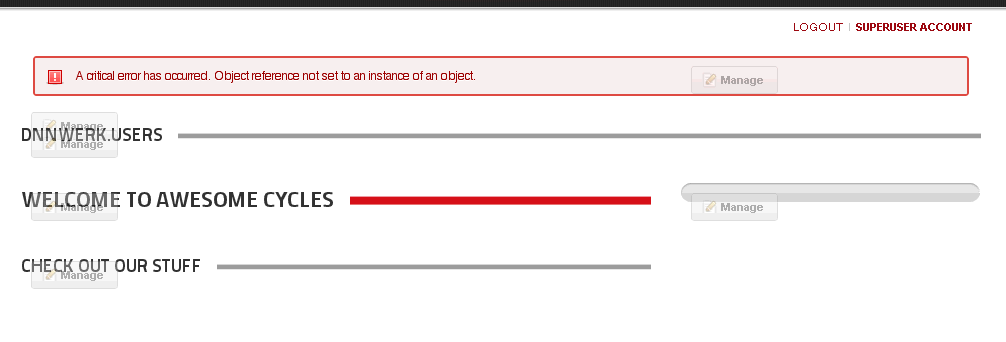
So, you’re going about your business, you upgrade your DotNetNuke 5.6.2 site to the latest, greatest version 6.0 that the world has been so vocal about, and then you go to use one of your favorite modules, dnnWerk Users. After adding it to the page, you click the update settings button and you end up with this, the dreaded “Object reference not set to an instance of an object” error. Oh no!

7-28-2011 10-11-40 AM

So, like any good DotNetNuke community member, you run to G+, Twitter or the Forums without doing any troubleshooting of your own. WRONG! First you take a look at the error message under Admin > Event Viewer, see if the text of the error means anything to you, see what you can do to fix it. Then you try uninstalling the module, reinstalling the module, changing skins and containers, etc., etc. When at last you have exhausted the possibilities using your own brain, you post your questions in the appropriate places.

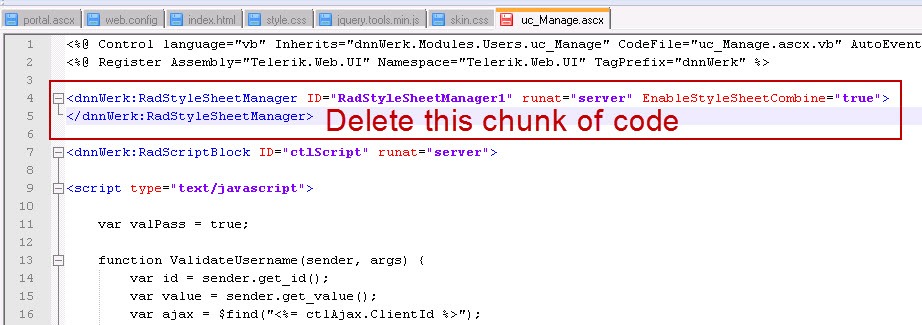
I find Twitter and G+ to be the most responsive of places to get questions answered, so I went there first and got several recommendations, anything from re-uploading the .dll’s in the /bin directory of my install to checking if a different skin or container worked. In the end, Brian Dukes saw the simple message in the error that there was more than one instance of a Telerik Rad Stylesheet Manager. This part of the error message read, “There must be only one instance of RadStyleSheetManager per page.” He noticed there was a reference to said object in the uc_Manage.ascx file.

This file is located at the root of your DNN install in DesktopModulesAdmindnnWerk.Users…

7-28-2011 10-09-07 AM

Open the file and remove the following line:

<dnnWerk:RadStyleSheetManager ID="RadStyleSheetManager1" runat="server" EnableStyleSheetCombine="true"> </dnnWerk:RadStyleSheetManager>

7-28-2011 10-29-50 AM

Save the file and restart the application from Host > Host Settings. Or you can CNTRL + F5 to refresh everything. And then you get back to your lovely dnnWerk User module, so the world now has order once more. Now, of course, you probably don’t want to throw that module on your home page, but hey, for the sake of a quick demo, you get the point.

7-28-2011 10-13-07 AM

To download the latest copy of the FREE Community Edition of DotNetNuke, visit http://www.dotnetnuke.com.

To download the latest copy of dnnWerk Users, visit http://dnnusers.codeplex.com.

Bare Bones Code Editing in DotNetNuke

notepad

Noob, Noobie, Newb, Greenie, Rookie, Beginner… I still find it hard at times NOT to think of myself with one of those labels when it comes to code. More and more, though, I’m seeing that I’ve graduated from Total Noob to Intermediate.

Now, before I get ahead of myself, I’m still very much an infant when it comes to higher level coding. For the most part, though, I’ve moved beyond the absolute basics, and feel I have something to offer. If I never get to the point where I challenge myself to try to add value to the community, then my own learning will stagnate. At the point you attempt to offer knowledge, you run the risk of being exposed and critiqued. I’m ok with that Smile.

For several years now, I’ve been working with DotNetNuke, and more recently, WordPress. Each of these requires editing code at some level, and these days I find that to be a BASIC requirement when building sites using either system. Yes, I now believe it is a basic, fundamental skill that any website designer, administrator, or even graphic designer needs to be familiar with. Editing code now just comes as part of the expectations, at times even for the simplest of personal blog sites.

So, let me share with you the two tools I think you need to do basic code editing,when it comes to DotNetNuke. That’s right, I only consider 2 programs as requirements for bare bones editing. The main goal here is to give the end user a light-weight option that requires minimal download and install time, but robust editing ability.

These tools can be used for almost limitless other types of editing, as well, but most of my work is with DotNetNuke. You quickly become familiar with the following main file extensions when working with DNN – .ascx, .aspx, .htm(l), .css, .js, .xml. To be sure, there are many more file types you could have in a DNN install, but for basic editing you won’t really get past these much.

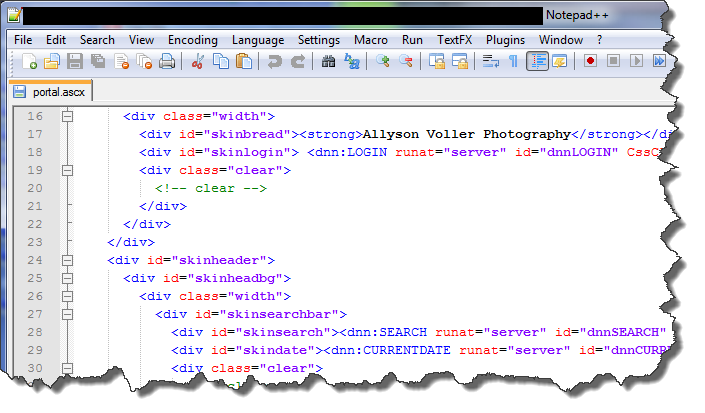
There really is ONE main editing program I use to edit all of these file types, Notepad++. I do use Microsoft Visual Web Developer Express 2010, also free, but it demands much more when it comes to system resources, the install is long and arduous, and so it does not qualify for either light-weight or fast install. While you CAN use the built-in Notepad app on Windows OS, Notepad++ has so many more features and options that it simply leaves Notepad in the dust.

Notepad++ gives you all of these features.

  • Tabbed file browsing – open multiple files in tabs across the top.
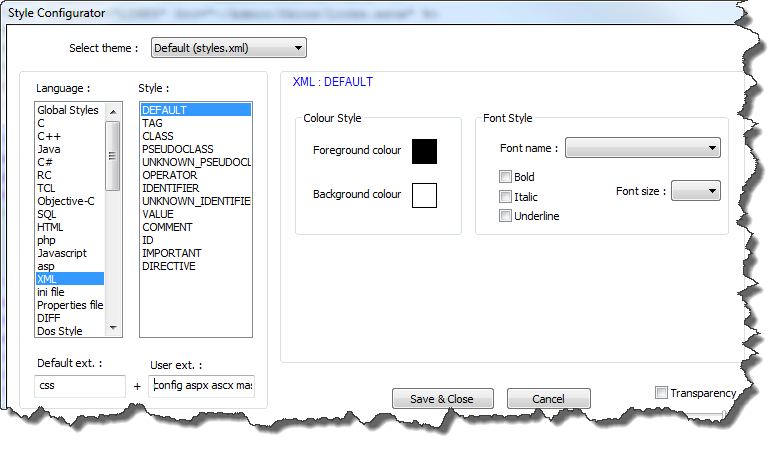
  • Syntax highlighting – to enable this for .ascx, .aspx, .config files, open Settings > Style configurator. On the left under Language: choose XML, and on the right under User ext. : type (space delimited, no dots) config ascx aspx – then press Save & Close, and you’ll have highlighted syntax when editing these files – See Figure 2 below.
  • Terrific find and replace options – If you have a small piece of code that needs to be replaced, you can actually use Notepad++ to find and replace within files that are in any directory on your computer, without opening them. This is particularly useful when editing a DotNetNuke skin that has several .ascx files in which you need to change something across the board.
  • Pinned recent files to reopen something you closed but need to get back to in a hurry.
  • Program updates from within the application. Check for updates and automatically download/upgrade on the fly!
  • Loads of customizations, down to the color scheme, recording your own macros, file extension attribution, and more.

Figure 2

notepad  styles

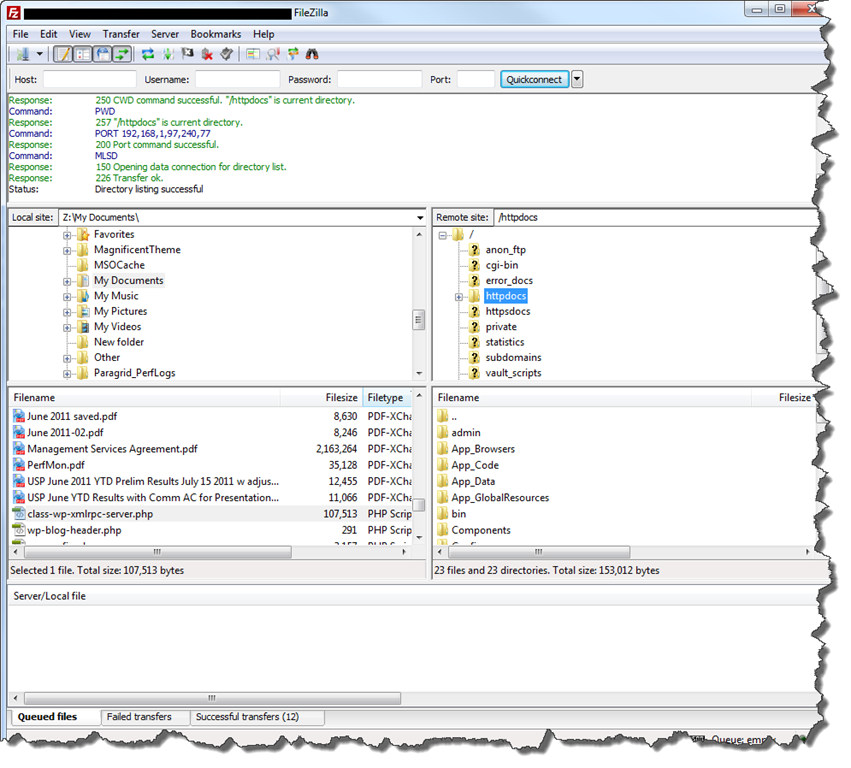
The “other” main tool that I have to say is indispensible for me is Filezilla. Filezilla is a free FTP (File Transfer Protocol) application that allows the user to transfer files to and from their web server using a Graphic User Interface. While it doesn’t really “edit” code, I consider it one of my two bare bones utilities because most of the time when I edit files, I’m immediately transferring them to a test or production server over the WWW. Filezilla gives you the following sweet options:

  • Save each FTP connection so you can quickly connect to your sites in the future
  • Drag and drop transfer between your local computer and the remote server
  • Overwrite confirmation pop-up that prevents you from hosing files by mistake

Filezilla Screenshot

filezilla

With these two tools in your editing toolbox, you can edit most, if not all, file types you’ll come across when you need to modify basic code in DotNetNuke skins, containers and modules. Happy editing!

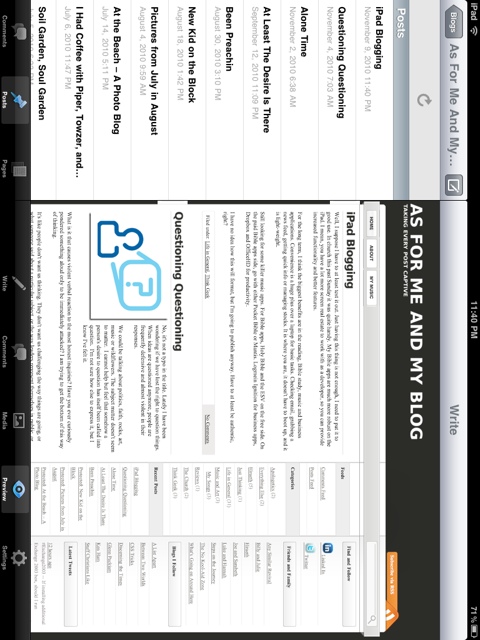
iPad Blogging

Well, I suppose I have to at least test it out. Just having this thing is not enough, I need to put it to good use. In church this past Sunday it was quite handy. My Bible apps are much more robust on the iPad. I mean, you have a lot more screen real estate to work with as a developer, so you can provide increased functionality and better features.

For the long term, I think the biggest benefits are in the reading, Bible study, music and business applications. Convenience is a huge plus over a laptop for basic tasks. Checking email, grabbing a news feed, getting quick info or managing stocks. It is where you are, it doesn’t have to boot up, and it is light-weight.

Still looking for some killer music apps. For Bible apps, Holy Bible and the ESV on the free side. On the paid Bible apps side, go with either Pocket Bible or Mantis. Logmein Ignition for business apps, Dropbox and OfficeHD for productivity.

I have no idea how this will format, but I’m going to publish anyway. Have to at least be authentic, right? Trying to insert an image. Should be a screen shot of this app.

Deleting Files Recursively by Age Using VBScript

The other day I started scouring the web for a VBScript to use for deleting files that had not been modified for a certain number of days.  I tried several, some of which were designed to delete files in a given folder, some that deleted certain file extensions recursively, but none that did it recursively by age alone.

When I say “age” I mean the DateLateModified property of the file object in question.  In this script, you specify the number of days (most accurate method), and the target folder, and the name of a logfile.txt that you want generated, as well.  With the log file you can look for OK on success and Failed if the delete didn’t work.

I put my scripts in a folder at C:scripts.  I called this one delete.vbs. 

To run this script, copy the code to your favorite text editor, save the file as a .vbs, open a command line to the directory and type “cscript delete.vbs”

Remember to edit:
1. Line 1 which indicates the target folder where files are going to be deleted
2. Line 2 which indicates the logfile that will be created
3. Line 3 which indicates how many days old you’re starting with… files with a DateLastModified OLDER than this date will be deleted permanently.

You should be able to access the logfile after the script runs.

Here’s the code:

VBScript for Recursive Delete
  1. strFolder = "C:\Test"
  2. logfilename = "C:\scripts\testlog.txt"
  3. intDays = 1277
  4. ForAppending = 8
  5. Set objFSO    = CreateObject("Scripting.FileSystemObject")
  6. Set objFolders    = objFSO.GetFolder(strFolder)
  7. objToday        = Now()
  8. objPastDate    = DateAdd("d", intDays*-1, objToday)
  9. Set objOutFile = objFSO.OpenTextFile(logfilename,ForAppending, True)
  10. objOutFile.WriteLine "——————————"
  11. objOutFile.WriteLine "Run at " & Date()
  12. objOutFile.WriteLine "——————————"
  13.  
  14. Recurse objFolders
  15. Sub recurse(ByRef objFolders)
  16.     Set objSubFolders = objFolders.SubFolders
  17.     Set objFiles = objFolders.Files
  18.     For Each File In objFiles
  19.         If File.DateLastModified < objPastDate Then
  20.             On Error Resume Next
  21.             objOutFile.Write "Deleting " & File.Path & "\" & File.Name
  22.             File.Delete
  23.             If Err.Number = 0 then
  24.                 objOutFile.WriteLine "..OK"
  25.             else
  26.                 objOutFile.WriteLine "..Failed"
  27.             end if
  28.             On Error Goto 0
  29.         End If
  30.     Next
  31.     
  32.     For Each Folder In objSubFolders
  33.         recurse Folder
  34.         If Folder.DateLastModified < objPastDate Then
  35.             On Error Resume Next
  36.             objOutFile.Write "Deleting " & Folder.Path & "\" & Folder.Name
  37.             objFSO.DeleteFolder Folder.Path, True
  38.             If Err.Number = 0 then
  39.                 objOutFile.WriteLine "..OK"
  40.             else
  41.                 objOutFile.WriteLine "..Failed"
  42.             end if
  43.             On Error Goto 0
  44.         Else
  45.         End If
  46.     Next
  47.     Set objSubFolders = Nothing
  48.     Set objFiles = Nothing
  49.     
  50. End Sub

Did I Mention My Geekness?

Maybe you already know.  Maybe you’re finding out for the very first time (although that is unlikely).  The fact is I’m really a geek.  I work with computers, networks, servers, websites, mobile devices, stuff like that.  And I have an iPhone on which I play really geeky games.  I like tower defense types of games the most.  Here are two screen-shots from my new favorite.

The game is called Sentinel 2, Earth Defense.  The object is to build up enough defensive gear to prevent the alien monsters from breaching the gate to our space ship.  Several different types of enemies come in waves to attempt a break-through.  The best weapon is the most expensive, and the boards below are filled with those types.  I don’t think I survived too many more waves of attack beyond wave 251.  🙂

IMG_0083

IMG_0084